Some DEs are focused on resource efficiency, but don’t look fancy. Others are fancy, but require a fairly modern setup. I have KDE (Fedora) installed on my laptop, I love its look and options. But it is not always snappy, some little freezes occur as well, even in basic situations (opening Firefox and v2rayN simultaneously was one of the cases). The most problematic thing is almost every app taking around 2-3 secs to open its window.
Many people would just tell me to install Xfce, but I still want a fancy desktop, I believe it is something I can afford on my setup. First I thought of GNOME, but it is controversial: some sources report GNOME as well optimized even for low-end machines, other claim it is much heavier than KDE.
What it your experience with desktop environments and their performance? Perhaps you have compared various DEs within the same distro and setup? How performant GNOME actually is compared to KDE? What are the balanced options to explore?
Have you done any tuning of KDE? I run it in a virtual machine with no hardware video acceleration and it feels fine. Turning off the compositor and animations might make a big difference.
I recommend you to try a window manager, maybe niri, but with something like dank material shell or noctalia, it is very light and can look very fancy
XFCE can look fancy too. Just look up some guide, how to set it up.
Have you looked at Cinnamon? It’s modern and comes with a lot of features. It supports both X11 and Wayland.
Does it support Wayland? I know they’re working on it, but last I read it was still a WIP.
If you want a DE which looks similar to KDE, try Xfce with Arc theme and some nice icon pack.
I use KDE (and it’s snappy on my hardware) but I like it because it has a lot of features and advanced options which it tries to make easily accessible to the user. IMO this is pretty much the opposite of “modern”, which is usually very minimalist, and UX designers like to remove or hide as much as possible. I’ve tried Gnome several times but personally I can’t stand it just because it’s a modern UI :) You try as many as you can and pick the one that suits you best of course, just thought it was funny that the same word can have different meanings to people.
Regarding GNOME: I’m using it to on all my devices, low end to high end. I would suggest just trying it and see if you like it.
Yeah, I’m on that boat as well.
I have mid computers from 2010 running that take far less than 2 seconds to open a browser, I think there’s either some missing driver for your hardware or something wrong with your hardware in the first place. Please post your exact specs so that we can try giving you better advice.
Also worth noting that for modern-ish computers the desktop environment is the least offender when it comes to resource consumption. Any modern browser will use roughly at least 2x memory compared to the desktop environment.
 8GB RAM with 5.7GB really available, couldn’t find more info on it, and an SSD drive, if it matters
The CPU is alright and the RAM should be sufficient for most tasks.
There are a couple of things that could impact performance here, first the SSD could be on its way out, or slow to begin with, so maybe post some info on that.
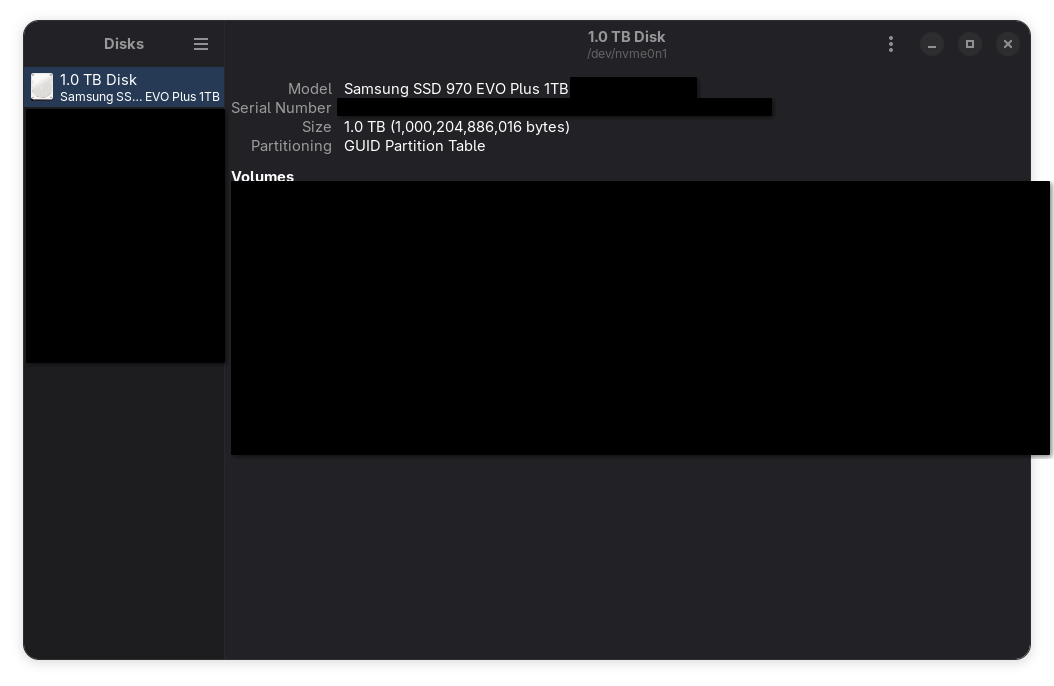
You can use gnome disks to get more information on your ssd, here’s a screenshot on my system, with some information obscured. The model name should be enough.
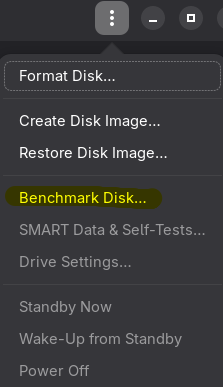
You can benchmark the SSD using either gnome disks again, as shown here:
Or alternatively you can use KDiskMark. Give us some numbers, maybe it’s gonna be as simple as replacing your SSD.
Another thing that could make your system feel sluggish, since you lament little freezes happening, is Plasma itself. I know what I said about desktop environment havyness, and I still stand by it: it’s not that Plasma is “heavier” or anything like that, it’s just that some of its code is not very well optimized and with slower drives it can show. Brodie Robertson made a video about this a couple of years ago, see if what he describes matches your problem, but consider that this is old information at this point and while some of these issues might still exist, they might have already been fixed.
Depends on what you mean by a DE’s “look”, if you just mean the theme and layout then you can theme something like xfce or lxqt to look similarly modern.
I’ve not tried it, but you could try cosmic? Or switch to a tiling WM or a scroller like Niri which would be even lighter (with the caveat that it’s lighter because it does less stuff for you by default).
What the actuall hell… I heard niri to be very resource-demanding… Should stick with tty /j
Niri is one of those ‘modern’ tiling window managers, which comes with a lot of eye candy and what not. It’s probably a lot lighter than your average desktop environment, but compared to a traditional tiling window, I would consider it fairly resource heavy.
So it is called heavy in the scope of tiling WMs, now I see
I would assume so. I have never seen anyone call it heavy, but I’m also not in circles where it’s being used either. It looks like a window manager for the younger generation. :)
I use niri, I don’t know if it’s ressource demanding or not but the readme seems to say it works fine on old computers:
Performance: while I run niri on beefy machines, I try to stay conscious of performance. I’ve seen someone use it fine on an Eee PC 900 from 2008, of all things.
Regarding eye candy it’s also very sober by default, it can do animations, blur and transparency but you have to ask for it in conf.
It looks like a window manager for the younger generation.
I use it because It’s a nice middle ground between traditionnal wms and tiling ones. No messy stacking windows, no need to think too much about the layout, plus you get a larger screen than everyone at no cost :)
with the caveat that it’s lighter because it does less stuff for you by default
There are very nice looking things like noctalia or dankmaterialshell that can take care of everything for you (dms in particular), including bar/dock/niri conf/wifi etc. It’s much easier to have something functional and nice looking than before (including with other wms like sway).
I use niri, I don’t know if it’s ressource demanding or not but the readme seems to say it works fine on old computers: Performance: while I run niri on beefy machines, I try to stay conscious of performance. I’ve seen someone use it fine on an Eee PC 900 from 2008, of all things.
That sounds promising!
Regarding eye candy it’s also very sober by default, it can do animations, blur and transparency but you have to ask for it in conf.
That’s good! While I love eyecandy, I don’t understand why you want it with a tiling window managers, but that’s just me being old I guess.
I use it because It’s a nice middle ground between traditionnal wms and tiling ones. No messy stacking windows, no need to think too much about the layout, plus you get a larger screen than everyone at no cost :)
I can’t imagine ever using it, but it’s great that it works for you (and a lot of other people). :D
I haven’t really looked into any of the modern alternatives, but it feels like they’re a lot easier to get started with if you’re new to tiling window managers, which can be overwhelming as it is.
There are very nice looking things like noctalia or dankmaterialshell that can take care of everything for you (dms in particular), including bar/dock/niri conf/wifi etc. It’s much easier to have something functional and nice looking than before (including with other wms like sway).
You lost me here. What is noctalia, dankmaterialshell and dms? :D
And docks? Like those bouncy panel thingies in Mac OS?
You lost me here. What is noctalia, dankmaterialshell and dms? :D
Nice “desktop shell” projects that you can install in addition to your wm of choice to get all the stuff that you expect from a DE without having to set it up manually. Otherwise since a wm comes with nothing but window management you’ve got to go the traditional route of picking up a bar, an app launcher, a screen locker, a widget to connect to wifi and plenty of other things to have a decent experience out of your wm. With noctalia or dankmaterialshell (dms is just the short way to write it) you don’t spend a week setting everything up to then be sad it’s not as pretty as what people do on unixporn.
The young fellows love this eye candy, and so I do. You’re right, I need to give a tiling WM a try. I have already thought about how inconvenient constant switching between the keyboard and the mouse is, and how unergonomic touchpads are.
I love eyecandy as well! It’s what got me interested in Linux back when Beryl was a thing. :) However. When it comes to tiling window mangers, I personally find it distracting, but I completely understand the appeal of it for others. A lot of the desktop screenshots looks really cool, but I don’t see how people can be productive with all the bling. :D
I’ve been a happy keyboard driven user for a long time now, and I can’t ever imagine going back to using the mouse for all the things. I still use it for my secondary web browser though, but that’s becasue a lot of websites sucks. :( I’m pretty sure that escaping most usage with any pointing device have saved my writsts from a lot of pain!
I have a 2010 laptop. Tried KDE and GNOME (as well as other DEs). I found KDE lagged on the laptop, and GNOME was super responsive. People told me it would be the opposite of that because GNOME was a heavy desktop, but it just caches stuff so its always ready and on a 15 year old laptop the cache was faster than the processor :)
What is your RAM size or whatever the cache goes to (oops I have a gap in my computer knowledge)?
Are you using Wayland or X11 as your Window Manager (WM)? I refuse to switch to Wayland because of how sluggish it feels on my Debian desktop feel.
Typically you can switch between the 2 on the login screen, usually in the bottom left or right.
I got about 20-25% better battery life when switching to Wayland with a fairly similar setup (Sway instead of i3).
If you experience performance issues, it’s most likely a bug.
Fedora KDE ships with Wayland so I use Wayland. No option to swtich, even though I probably have X11 installed
X11 was completely removed in Fedora 43 I believe
https://fedoraproject.org/wiki/Changes/WaylandOnlyGNOME#Wayland-only_GNOME
This applies to the GNOME edition. While KDE is planning to drop X11 support, it hasn’t yet. And I’m pretty sure I’ve seen some x.org packages in my installation, not sure if they are full or just for Xwayland
Ah right, I forgot about the different editions! Been on GNOME for so long.
Now I don’t know for Fedora in particular but if you can install the XOrg/X11 packages and switch your SDDM theme so that it includes the X11/Wayland toggles perhaps you can get it working?
Unfortunately I can’t be much else help.
[…] almost every app taking around 2-3 secs to open its window.
This also happens if you have your system on a hdd instead of a sdd.
Not sure if that’s normal. LibreOffice or a webbrowser for example take a while. A calculator or something small should open instantly.
I have an SSD. And it used to be snappy on Windows 10. The browser I use is not that bloated, again, it used to open instantly on Windows.
I think Browsers on Windows sometimes do dirty tricks and already load on boot (in the background). So once you click to “open” the browser, it’s already in memory and pops up instantly. That might be the reason why it’s instand on Windows, and takes time on Linux.
Both my browsers on Linux also take 2-3s to open. Though I regularly don’t notice. I’ll just leave the browser open all day, because I need it all the time. I closed and re-opened it right now, and it definitely also takes a very few seconds on my machine with a GNOME desktop.
Why would a thing like Waterfox preload on boot? The boot by the way is also pretty slow, systemd loading 100500 services on start I guess. But now this is an idea - enabling browser loading in background at boot
Have you considered going DEless? Its been a while since I did but back then I was able to get a modern looking system with Openbox (amongst others but thats what I settled on). I dont know what the state of DEless windows managers are these days but I’ve seen some very nice looking setups. Might be something to consider?